Best Medical Photo Apps for Dermatologists (2026 Buyer's Guide)
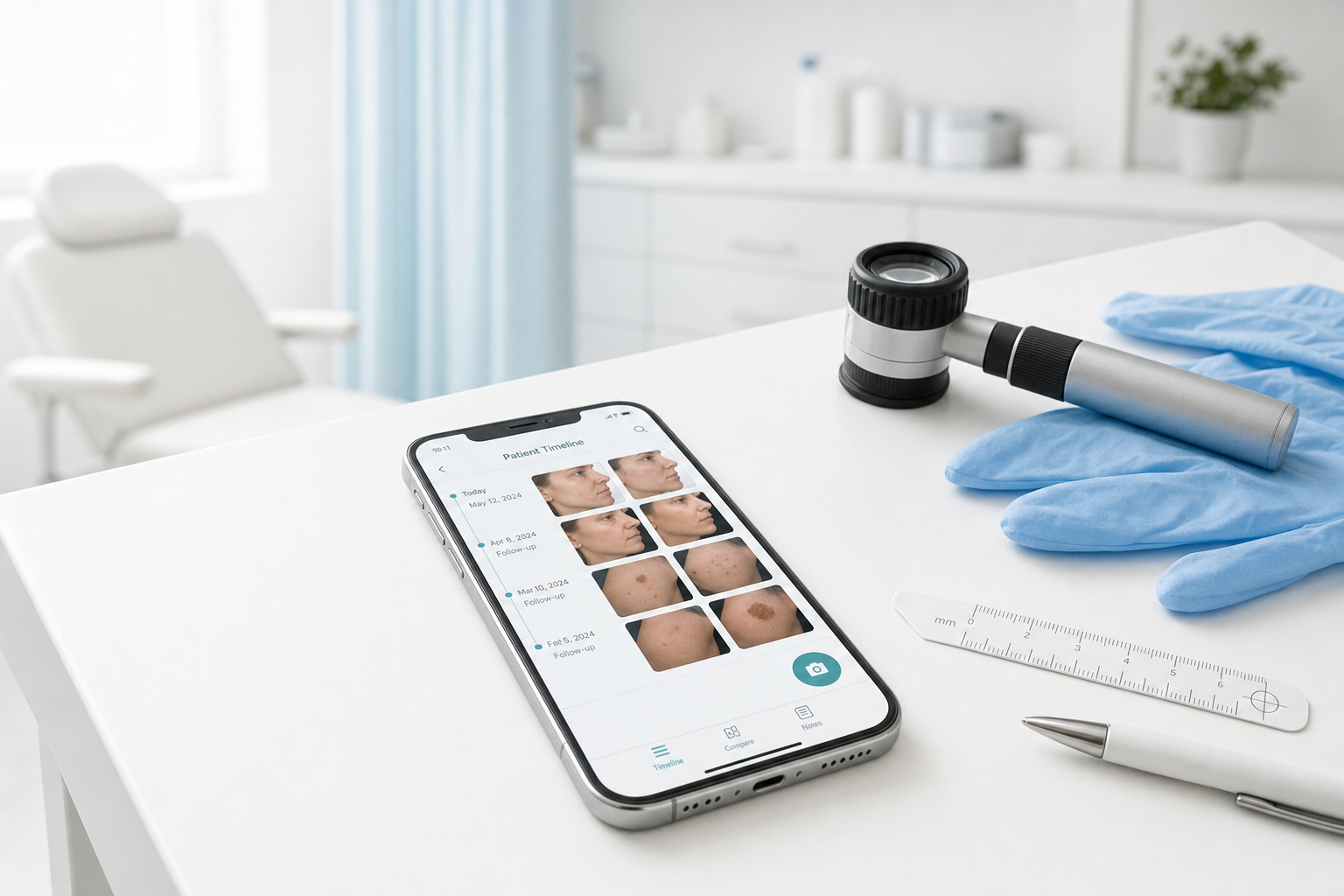
You are three weeks into an isotretinoin course. The patient asks whether the inflammatory acne is improving. You unlock your phone, scroll past holiday photos and a screenshot of a parking ticket, and finally find last month's cheek image — but the lighting was different, the angle was off, and you cannot show a fair comparison on screen before the consultation moves on.
That moment is not a photography failure. It is a workflow failure. Dermatology runs on serial images: acne and isotretinoin monitoring, eczema and psoriasis flares, rosacea and melasma follow-up, pigmented lesion surveillance, post-laser and PDT response, biologic outcomes, and telederm second opinions. A 2018 survey of Australian dermatologists found that 46% stored clinical images on a smartphone (Abbott et al., Australasian Journal of Dermatology), often without a dedicated clinical workspace or a secure path when a colleague needs to weigh in.
This buyer's guide compares the best medical photo apps for dermatologists in 2026 — standalone mobile documentation tools, practice-management platforms with photo modules, and EMR-native capture — so you can match software to how your clinic actually works.
What is the best medical photo app for dermatologists? For most solo dermatologists, PixioDoc: a self-serve iOS and Android patient timeline from €8.99/month. PhotoDoc suits high-volume capture with AI facial analysis. CureCast and ImageAssist fit EMR-integrated platforms from $150/month. A personal phone stays free and leaves the photos in the camera roll.
Solo GPs with a dermatology interest need different tooling than a multi-clinician group routing images into Epic, and an Android-heavy practice cannot use an iOS-only capture app for every clinician.
The Short Answer
- Best self-serve mobile app for most solo dermatologists: PixioDoc — Free covers up to 10 patients and 5 sessions per patient, including capture, ghost overlay, and the progress slider. Pro (€8.99/month or €79.99/year) adds unlimited patients and sessions, side-by-side and multi-image comparison, background removal, PDF reports, sharing, and web access. Teams is that Pro feature set plus organisation billing for a dermatology group of 4 or more.
- Best photo-count mobile app with AI facial analysis: PhotoDoc — Starter from $9.99/month (1,000 photos), Pro at $59.99/month (100,000 photos plus AI facial analysis and framing templates)
- Best if you want photos inside a practice-management stack: CureCast — Starter from $150/month (annual billing), Practice tier at $200/month with overlay comparison and remote patient photo intake
- Best for ASPS-standardized surgical dermatology photography with EMR routing: ImageAssist — from $150/month per site, iOS/iPad/web capture with SmartGuides, consent forms, and integrations with Epic, 4D EMR, Apollo, Symplast, and Mindbody
- Best if you already live in your EMR: ModMed EMA, Nextech, or similar built-in photo modules — adequate for chart attachment, weaker for live in-consult comparison during follow-up visits
PixioDoc is not the right fit if you need EMR-native routing, built-in consent forms, remote pre-visit patient photo intake, or ASPS prescriptive framing standards out of the box. Be honest about the job before you buy.
What Dermatologists Should Look For in a Photo App
-
Patient timeline, not camera roll folders. Acne courses and chronic dermatosis follow-up span months — every visit should attach to the right patient without manual filing.
-
Lesion protocol support. Mole monitoring needs overview, mid-range, and close-up views at repeatable distance — sometimes alongside dermoscopy.
-
In-consult comparison. Side-by-side views and progress sliders show eczema clearance or post-PDT change while the patient is in the chair.
-
Ghost overlay or framing guides. Prior-photo overlays or standardized guides keep subtle acne, melasma, and post-procedure changes readable when angle drifts.
-
Secure colleague sharing with an audit trail. Telederm second opinions need role-based access — not WhatsApp threads.
-
EU hosting and encryption. Patient photos are health data under GDPR. EU-hosted storage and encryption are baseline expectations. Educational overview only; confirm requirements with your counsel.
-
Self-serve signup vs demo-led sales. Solo dermatologists often need to test a real workflow this week, not book a platform demo.
-
Android support. Confirm every clinician's phone is supported before clinic-wide rollout.
-
PDF progress reports. Curated PDF handoffs for GPs and referrers beat emailing raw JPEGs from exported folders.
Capture technique matters as much as software. For lighting, distance, and lesion view sets, see medical photography best practices.
Comparison at a Glance
| App | Best for | Free tier | Starting price | Android | Comparison tools | EMR integration | Self-serve |
|---|---|---|---|---|---|---|---|
| PixioDoc | Solo and small-clinic dermatology documentation | 10 patients, 5 sessions each, no time limit | €8.99/mo Pro | Yes | Slider (Free); side-by-side, multi-image (Pro and Teams) | No — standalone | Yes — App Store / Google Play |
| PhotoDoc | High photo volume, AI facial analysis | 50-photo trial | $9.99/mo (1,000 photos) | Yes | Before/after, ghost overlay | No | Yes |
| CureCast | Derm + plastics + medspa PM stack | 14-day trial | $150/mo Starter | Yes | Overlay/slide on Practice tier | Limited — PM platform | Yes — website and app stores |
| ImageAssist | ASPS-standardized capture + EMR routing | 7-day trial | $150/mo per site | No — iOS/iPad/web only | Before/after comparison | Yes — Epic, 4D EMR, Apollo, others | No — demo onboarding |
| Personal phone + cloud folder | Nothing — baseline habit | Free | Free | Yes | Manual only | Manual upload | N/A |
| Dermcam | Canadian OSCAR/Juno EMR workflows | Not public | Custom | No — iOS | Limited | OSCAR/Juno (Canada) | No |
| EMR photo modules (e.g. ModMed EMA) | Charting-first practices already on the EHR | With EHR subscription | EHR pricing | Varies | Weak live comparison | Native | No |
Tools built primarily for medspa and aesthetic marketing workflows — RxPhoto, TouchMD Snap, Symplast, Aesthetic Record — can document some dermatology-adjacent procedures, but they target injectables, body contouring, and cosmetic marketing galleries rather than general medical dermatology documentation. Worth a look if your practice is aesthetic-heavy; otherwise prioritize clinical documentation apps above.
PixioDoc
Who it's best for: Solo dermatologists, locum dermatologists, and small clinics that need a dedicated patient photo app without replacing their EHR or buying a practice-management platform. A dermatology group sharing one record should look at Teams.
Pricing: Free for up to 10 patients and 5 sessions per patient, with no time limit — capture, video, editing, tags, session drafts, ghost overlay, and the progress slider included. Pro is €8.99/month or €79.99/year for unlimited patients and sessions, side-by-side and multi-image comparison, background removal, PDF patient reports, web app access, and role-based sharing. Teams is that Pro feature set plus organisation billing for four or more clinicians, arranged with sales.
Strengths: Self-serve iOS and Android download; patient timelines with tags and last-seen sorting; ghost overlay for acne, melasma, and post-laser series; progress slider on Free; side-by-side and multi-image comparison on Pro and Teams; PDF reports; EU-hosted encrypted storage with audit trails; mixed-specialty capable if your practice also covers wound care or orthopedics.
Limitations: No EMR integration, built-in consent forms, or dermoscopy hardware; side-by-side and multi-image comparison, sharing, web app, and PDF reports require Pro or Teams.
See the dermatology workflow page and detailed comparisons: PixioDoc vs PhotoDoc, PixioDoc vs CureCast, PixioDoc vs ImageAssist.
PhotoDoc
Who it's best for: Dermatologists who capture very high photo volumes and want AI facial analysis or prescriptive framing templates — and who accept photo-count pricing rather than per-patient caps.
Pricing: Trial of 50 photos — no permanent free tier. Starter is $9.99/month for 1,000 photos. Pro is $59.99/month for 100,000 photos plus AI facial analysis and advanced positioning tools. Pro Teams is $349.99/month.
Strengths: Mature iOS and Android app with cloud sync; ghost overlay and before/after collages; AI facial analysis and framing templates on Pro.
Limitations: Photo-count caps bite mid–isotretinoin courses; Pro at $59.99/month is roughly 6× PixioDoc Pro; no built-in PDF report workflow.
Full feature and pricing breakdown: PixioDoc vs PhotoDoc.
CureCast
Who it's best for: Dermatology and plastic surgery practices that want patient photos inside a broader practice-management platform — scheduling, e-prescribing, and billing on higher tiers — not documentation alone.
Pricing: 14-day free trial. Starter from $150/month (annual billing; $180/month if billed monthly) includes video capture. Practice tier at $200/month adds overlay and slide comparison and remote patient photo intake.
Strengths: Unlimited photo storage; video on Starter tier; remote patient photo intake on Practice tier; PM bundling (scheduling, e-prescribing, billing) on higher tiers; vendor states HIPAA, GDPR, PHIPA, and PDPL compliance.
Limitations: ~15× PixioDoc Pro for documentation alone; overlay comparison and remote intake require $200/month Practice tier; confirm data residency details for your jurisdiction.
Compare workflows and pricing: PixioDoc vs CureCast.
ImageAssist
Who it's best for: Dermatology and surgical practices standardizing photography to ASPS-aligned SmartGuides, with images routing directly into Epic, 4D EMR, Apollo, Symplast, or Mindbody.
Pricing: 7-day free trial. Plans from $150/month per site. Demo-led onboarding.
Strengths: ASPS-aligned SmartGuides; built-in consent forms; Epic, 4D EMR, Apollo, Symplast, and Mindbody integrations; automatic background removal and Canva marketing export.
Limitations: iOS/iPad/web only — no Android; $150/month per site with demo onboarding; optimized for standardized surgical photography over flexible chronic dermatosis monitoring.
Full comparison: PixioDoc vs ImageAssist.
Personal Phone, Dermcam, and EMR Modules
Personal phone + cloud folder — free, zero setup, and where most dermatologists start. No patient timeline, no in-consult comparison, no audit trail. Images sync to personal iCloud or Google Photos; telederm cases end up in WhatsApp. See personal phone patient photos and Google Drive patient photos under GDPR.
Dermcam — Canadian OSCAR/Juno EMR integration; images route to chart, not a standalone timeline. Niche fit for integrated Canadian workflows; no Android.
EMR photo modules (ModMed EMA, Nextech, Epic) — single system of record, weak live comparison during follow-ups. Fine if you rarely compare serial images in the room; a dedicated app alongside the EHR works better when visual progress drives every visit.
Recommended Workflow for Dermatology Photo Documentation
-
Create the patient record before the first photo. Add the patient when they walk in — or at booking for telederm — so every image from visit one lands on the correct timeline. Do not capture first and file later.
-
Capture with a consistent protocol. For general dermatosis, use the same lighting, distance, and background every visit. For pigmented lesions, shoot overview, mid-range, and close-up — plus dermoscopy when indicated — at the same scale each time. Mark floor position for standing body views.
-
Compare at follow-up in the consultation. Open the timeline, pull baseline and current visit, and show the progress slider or side-by-side view before you ask the patient how they think treatment is going. Let the image answer first.
-
Share securely for second opinions. Invite a colleague with Viewer or Editor access inside your documentation app — not via consumer messaging apps. See sharing medical photos between professionals for the full secure-sharing checklist.
-
Generate a PDF handoff when needed. For isotretinoin monitoring letters, lesion surveillance referrals, or patient take-home summaries, build a curated PDF from selected sessions rather than emailing raw images. Details in patient progress reports for clinical sharing.
Common Mistakes Dermatologists Make
-
Storing clinical images on personal phones indefinitely. The convenience cost shows up as privacy exposure, lost images, and unprofessional scrolling mid-consultation. See personal phone patient photos.
-
Inconsistent lesion distance between visits. A mole that looks unchanged at 30 cm and different at 10 cm is a documentation error, not a clinical finding. Fix distance before you fix software.
-
Mixing telederm screenshots in chat apps. WhatsApp and iMessage threads have no audit trail and no controlled access revocation. Patient images belong in a clinical workspace.
-
Hitting photo-count limits mid–isotretinoin course. Six-month acne protocols with three views per visit generate dozens of images per patient. Per-photo pricing punishes thorough documentation.
-
Buying an aesthetic EMR for general dermatology documentation. Medspa-first platforms optimize marketing galleries and injectable workflows — not chronic eczema tracking or lesion surveillance protocols.
-
Treating GDPR as a checkbox instead of a workflow. A compliant app inside a non-compliant habit — personal camera roll backup, shared consumer cloud folders — still fails. See what makes a medical photography app GDPR compliant.
Frequently Asked Questions
What is the best medical photo app for dermatologists?
PixioDoc is the best starting point for most solo dermatologists who want self-serve iOS and Android documentation with a permanent free tier and Pro at €8.99/month. PhotoDoc suits clinicians who need AI facial analysis at higher photo volumes. CureCast and ImageAssist fit practices buying a $150+/month platform or EMR-integrated photography. The right choice depends on whether you need standalone mobile capture, PM bundling, or chart-native routing.
Is PixioDoc better than PhotoDoc for dermatology?
PixioDoc is better for most solo dermatologists on price and workflow: unlimited patients on Pro at €8.99/month vs PhotoDoc's $59.99/month Pro for comparable comparison features, plus a permanent free tier for 10 patients and 5 sessions per patient. PhotoDoc is better if you specifically need AI facial analysis or rigid framing templates and accept photo-count pricing. See PixioDoc vs PhotoDoc.
Do dermatologists need a separate app or can the EHR handle photos?
A separate app is worth it when in-consult visual comparison drives your follow-up visits — acne, eczema, psoriasis, melasma, and post-procedure monitoring. EMR photo modules attach images to the chart but are typically weaker for live side-by-side review during consultations. Many dermatologists run a dedicated documentation app alongside ModMed, Epic, or their existing EHR.
What is the cheapest dermatology photo documentation app?
PixioDoc's free tier covers up to 10 patients and 5 sessions per patient, with no time limit — the lowest-risk way to test a clinical workflow. PhotoDoc Starter is $9.99/month but caps at 1,000 photos. Personal phones are free but carry the highest hidden cost in time, organization, and privacy exposure. CureCast and ImageAssist start at $150/month.
Can I use the same app for acne, eczema, and mole monitoring?
Yes — if the app organizes by patient timeline rather than by condition folder. PixioDoc, PhotoDoc, CureCast, and ImageAssist all support multiple dermatology use cases on one patient record. What changes per condition is your capture protocol (facial views for acne, lesion distance for moles), not the storage system.
Do dermatology patient photos need special security?
Yes. Patient photographs that identify an individual and relate to health or treatment are sensitive data — special category data under GDPR in the EU and UK, and generally treated as protected health information in the US. They require appropriate encryption, access controls, and lawful basis for processing. Educational overview only — not legal advice. Storage in personal galleries or consumer cloud accounts without clinical controls is a common gap. See GDPR-compliant medical photography app features.
Does PixioDoc work on Android for dermatology clinics?
Yes. PixioDoc runs on both iOS and Android. Capture, ghost overlay, and the progress slider are on every plan. Side-by-side comparison, sharing, and PDF reports are on Pro and Teams. ImageAssist does not support Android capture, which matters for mixed-device practices.
Ready to move dermatology photos off your personal camera roll? Start free with up to 10 patients and 5 sessions each. Ghost overlay and the progress slider are included. Pro and Teams add side-by-side comparison, PDF reports, and sharing. Download on the App Store or Google Play, or explore the dermatology workflow.
Keep patient photos out of your camera roll
PixioDoc gives you a dedicated workspace to capture, compare, and share patient photos — organized by patient timeline, never mixed with your personal gallery.
EU-hostedEncrypted in transit & at rest
Keep reading

How to Document Wound Healing with Photos (And What to Look for in a Wound Photo App)
A practical wound photography protocol for clinics — consistent lighting, scale, framing, and visit cadence — plus the criteria that matter when choosing a wound photo documentation app.
Read article
How to Take Professional Before-and-After Photos in Your Clinic
A camera-agnostic playbook for clinicians and medspas: lighting, framing, distance, and a smartphone workflow for before-and-after photos that look professional.
Read article
What Makes a Medical Photography App GDPR Compliant? 10 Features to Look For
Choosing a medical photography app for your clinic or medspa? Here are the 10 features that matter most under GDPR — from keeping photos out of personal galleries to EU hosting, audit trails, DPAs, and right-to-erasure workflows.
Read article